amuleapi — REST API & Web UI
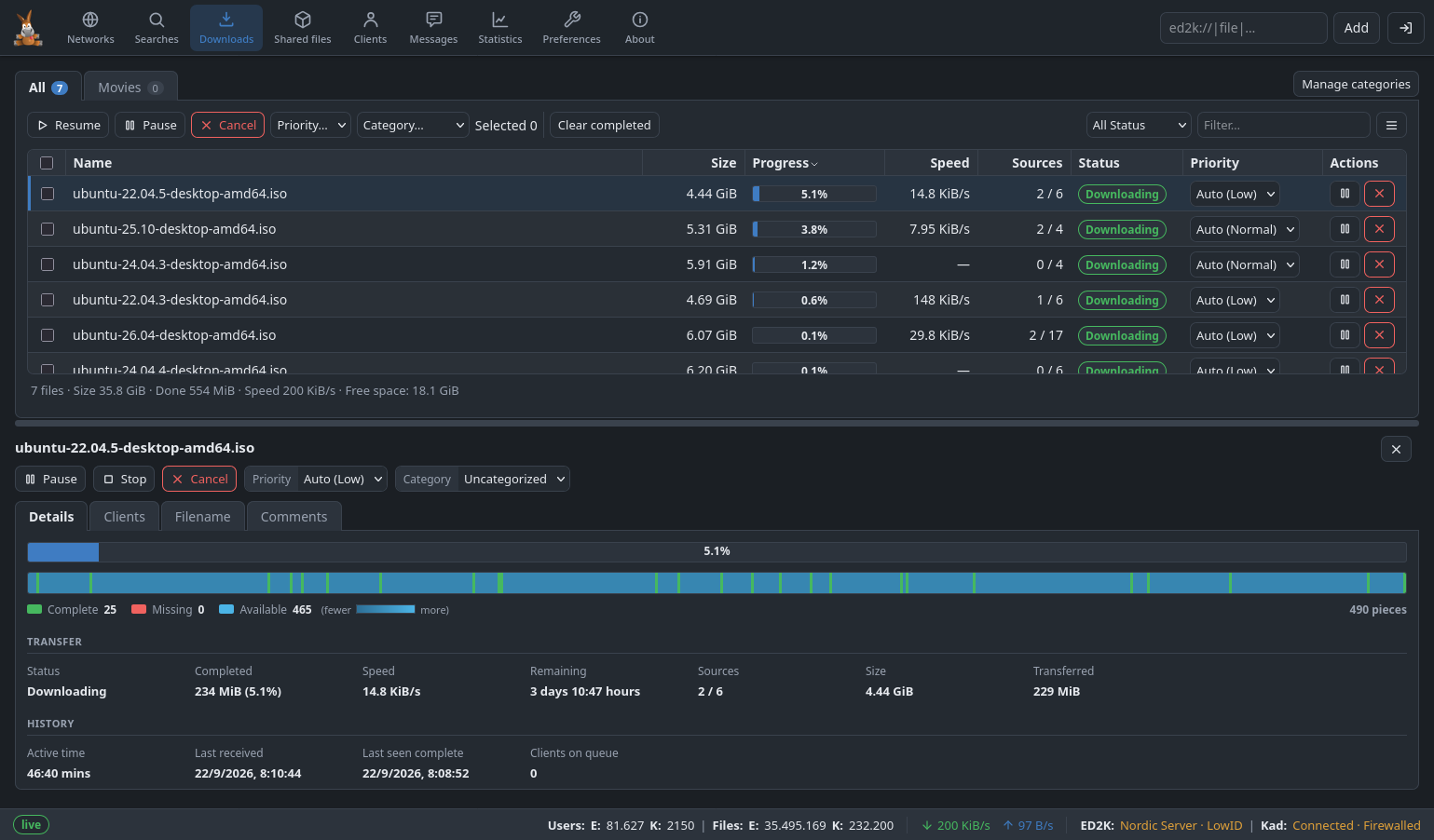
amuleapi is a standalone daemon that connects to a running amuled (or amule) instance as an ordinary External Connections (EC) client and exposes a modern control surface: a versioned REST API under /api/v1/*, a Server-Sent Events (SSE) stream for live updates, and the full browser-based Web UI. It is the replacement for amuleweb.
This functionality is available from aMule 3.1.0 onwards.
Overview
Where amuleweb renders HTML server-side from templates, amuleapi serves a clean HTTP API and a single-page Web UI that talks to it. Use amuleapi when you want to control aMule from a browser, script it over REST, or receive real-time updates without polling. It runs anywhere amuled runs, including headless servers and NAS devices.
amuleapi speaks HTTP only, by design — terminate TLS in a reverse proxy in front of it (see Security Model).
Command-Line Options
| Option | Description |
|---|---|
-h, --host=<host> | Host where aMule is running, for the EC connection (default: 127.0.0.1; overrides [EC] Host). -h is the host, not help — use --help |
-p, --port=<port> | aMule's EC port (default: 4712; overrides [EC] Port) |
--disable-ec-encryption | Connect to aMule without EC encryption for this run (overrides [EC] Encryption) |
--force-zlib | Always compress the EC link to aMule. By default amuleapi skips compression when the core's address is on the local network; use this when that address is a VPN tunnel over a slow Internet link |
--bind=<address> | Address the HTTP server listens on (default: 127.0.0.1; overrides [Server] BindAddress). With any address other than 127.0.0.1, ::1 or localhost, amuleapi refuses to start until an admin or guest password is set |
--http-port=<port> | HTTP port the browser and API clients connect to (default: 4713; overrides [Server] Port; a value outside 1–65535 is ignored) |
--config-dir=<path> | Use the given configuration directory for amuleapi.conf, amuleapi-passwords, amuleapi-jwt-secret and the default log file (default: the aMule configuration directory, e.g. ~/.aMule/ on Linux; created with mode 0700 if missing) |
--set-admin-pass-stdin | Read the admin password from stdin, store it in amuleapi-passwords, then exit (see Changing Passwords). An empty admin password is rejected |
--set-guest-pass-stdin | Set the guest password the same way; an empty line disables guest access |
--set-ec-pass-stdin | Read the EC password of the aMule core from stdin, store its MD5 digest as [EC] PasswordMD5 in amuleapi.conf, then exit (see EC password for a hand-started amuleapi) |
--set-admin-pass=<password> | Like --set-admin-pass-stdin, but takes the password from the command line, which exposes it in the process list and shell history |
--set-guest-pass=<password> | Store the guest password the same way; an empty value (--set-guest-pass=) disables guest access |
--log-file=<path> | Write the log to <path> instead of the default <config-dir>/amuleapi.log. The log is a timestamped copy of the console output, capped at 10 MiB and rotated to <path>.1 |
--no-log-file | Do not write a log file; print to the console only (takes precedence over --log-file) |
-q, --quiet | Suppress amuleapi's normal output, including error messages, on the console and in the log file; only a few warnings on stderr still appear |
--foreground | Stay in the foreground (the default; amuleapi never detaches — use systemd/launchd or nohup to run it as a service) |
--version | Print the version number and exit |
--help | Print a short usage description and exit |
Only one password setter (--set-*-pass*) can be given per invocation; with more than one, amuleapi exits with an error.
There is deliberately no --password flag: amuleapi is a long-running process, so a password on its command line would stay visible to any local user via ps for as long as it runs, and would end up in shell history, service unit files and wrapper scripts. An auto-started amuleapi uses a one-off token (see Auto-Start); a hand-started one reads the EC password from its config file (see EC password for a hand-started amuleapi). Use --set-admin-pass-stdin / --set-guest-pass-stdin (or Preferences → Remote Controls in the GUI) to set the Web UI login passwords.
Configuration File
amuleapi reads amuleapi.conf from its configuration directory. The file is created on first run with mode 0600. On every load, amuleapi checks that no group or other permission bits are set and refuses to start otherwise (it prints the chmod 600 command to fix it); this check does not apply on Windows. It has four sections:
[Server]— HTTP bind address, port, CORS, and the Web UI asset root.[EC]— howamuleapireaches the aMule core (host, port, password or password digest, encryption).[Auth]— per-IP rate limiting for logins and rejected tokens.[Streaming]— SSE ring-buffer size and the concurrent file-download limit.
Most settings can also be set from Preferences → Remote Controls or the command-line options above. See the amuleapi.conf reference for every key, its default, and a full example.
Auto-Start
When aMule (or amuled) has amuleapi enabled in Preferences → Remote Controls, it launches amuleapi as a child process at startup and stops it on shutdown. In this mode aMule writes a one-off EC token to the file amuleapi-ec-token (mode 0600, read once, then deleted) and passes only the configuration directory, addresses and ports on the command line — so no EC password is needed.
aMule looks for amuleapi next to its own executable first, then in PATH. If an auto-started amuleapi exits with an error, aMule restarts it, waiting from 5 up to 60 seconds between retries.
EC password for a hand-started amuleapi
A hand-started amuleapi needs the EC password of the core. Store it once with:
amuleapi --set-ec-pass-stdin
It asks for the password without echoing it, writes its MD5 digest as [EC] PasswordMD5 in amuleapi.conf, and exits. Alternatively, copy the digest from [EC] Password in remote.conf into PasswordMD5, or put the plaintext password in [EC] Password. Set only one of the two, or amuleapi refuses to start. The digest logs in to the core just like the password, so keep the file private.
Authentication
amuleapi issues an HS256 JSON Web Token (JWT) on login, valid for 24 hours. Present it on every request either as an Authorization: Bearer <jwt> header or via the HttpOnly cookie amuleapi_token (SameSite=Strict; Path=/api/v1). The cookie is deliberately not marked Secure, so a single login response works whether or not TLS is terminated in front of the daemon.
There are two roles:
- admin — full read/write access.
- guest — read-only, and available only when a guest password has been set. Guests do not see preferences that may contain credentials, such as the proxy user name or the MaxMind license key.
Log in with a password, not a username; the password you enter selects the role. The signing secret is 32 random bytes generated on first run and stored in amuleapi-jwt-secret (mode 0600). Login attempts and rejected tokens are rate-limited per IP using the [Auth] knobs above; exceeding a threshold returns 429 Too Many Requests with a Retry-After header.
Cookie-authenticated changes (POST, PUT, PATCH, DELETE) from another origin, such as a page on another port of the same host, are refused with 403 forbidden unless that origin is in CorsOriginAllowlist. Bearer-token requests and scripts such as curl are not affected. Behind a reverse proxy, see Security Model.
Changing Passwords
Set or change the admin and guest login passwords from the console with amuleapi itself:
amuleapi --set-admin-pass-stdin
amuleapi --set-guest-pass-stdin
Each command asks for the new password twice without echoing it. A script can pipe it in instead, with no confirmation:
printf '%s\n' "$PW" | amuleapi --set-admin-pass-stdin
--set-admin-pass=<password> and --set-guest-pass=<password> also work, but expose the password in the process list and shell history.
Each command hashes the password (salted PBKDF2-HMAC-SHA256), writes it to the amuleapi-passwords store (mode 0600), and then exits immediately — it does not start the HTTP server or connect to aMule. No path is needed: amuleapi uses the same configuration directory as amuled (add --config-dir=<path> if it is non-standard). The change takes effect at the next login, with no restart, and the command returns a non-zero exit code on failure (so a chain like amuleapi --set-admin-pass-stdin && systemctl restart amuleapi fails loudly).
An empty guest password turns guest access off (end of input leaves the password unchanged):
printf '\n' | amuleapi --set-guest-pass-stdin
A stored password can never be read back, only replaced. The same passwords can also be set from Preferences → Remote Controls (in the monolithic amule, or pushed to the core by amulegui over EC), or over REST with PATCH /api/v1/auth/passwords. Every route writes the same amuleapi-passwords file.
This is the Web UI login password (admin/guest). It is different from the [EC] Password in amuleapi.conf, which is the password amuleapi uses to connect to the aMule core over External Connections (see EC password for a hand-started amuleapi).
Server-Sent Events
GET /api/v1/events returns a text/event-stream carrying incremental deltas — it does not send an initial snapshot. A client bootstraps by opening the stream, fetching current state from the REST endpoints, and then applying the deltas that arrive. Events are grouped into channels:
downloads, shared, servers, clients, friends, status, logs, search, chats, comments.
Subscribe to a subset with ?channels=<comma-separated>; the resync control frame is always delivered. A : keepalive heartbeat comment is sent every 15 seconds. On reconnect, the client's Last-Event-ID header replays any missed events held in the ring buffer (see [Streaming] EventBusRingCapacity).
A stream closes when its session ends (logout, password change, guest access disabled, or token expiry). At most 32 streams can be open at once, 4 of them reserved for admins; more get 503 too_many_streams.
REST API
All endpoints live under the base path /api/v1. The endpoint groups are:
- System — health, version, status.
- Authentication — login, logout.
- Downloads — the download queue, plus per-file comments, filenames, clients and clear-completed. New downloads can be added from eD2k links or magnet links (with the eD2k hash and file size).
- Clients and Known clients — active peers and the credit-store history.
- Shared files — shared files, share directories, verify, media refresh, and deleting a complete file from disk.
- Servers — the eD2k server list, plus the server-list update (
POST /api/v1/servers_update): without a body it downloads every source in theservers.update_urlspreference, in order; with aurlit downloads that one list without saving it. - Friends, Categories.
- Preferences — read (
GET) and update (PATCH). - Network control — networks and Kad control.
- IP filter, GeoIP (database update; see IP2Country).
- Logs, Statistics, Search (local, global, Kad, or
allfor eD2k and Kad together), Assets, Chat (including CAPTCHA answers).
Security Model
- HTTP only by design — put a reverse proxy in front to terminate TLS. To serve it under a path of a shared hostname (e.g.
/amule/), setBasePath. - Behind a reverse proxy that rewrites
Host(as nginx does by default), have the proxy pass the original host inX-Forwarded-Host(for nginx:proxy_set_header X-Forwarded-Host $http_host;), or older browsers get403on their own changes. - Listens on loopback (
127.0.0.1) unlessBindAddressis changed. - The config file and the generated secret/token files are restricted to
0600. - Folder changes need the daemon's permission. The incoming, temporary, shared and category folders can only be set inside the folders the core allows. The list is empty by default, so such changes are refused with
403 path_not_alloweduntil it is filled in. The API exposes the list read-only as thedirectories.allowed_remote_rootspreference. A few daemon-local settings are read-only too (400 read_only_field):files.ffprobe_path,online_signature.directoryanddirectories.follow_symlinks. Seeamuled→ Settings Reserved to the Daemon Host.
Reference
The full, authoritative specification lives in the aMule source repository (do not treat this page as the contract):
docs/QUICKSTART-AMULEAPI.md— first-run and reverse-proxy setup.docs/api/REFERENCE.md— the complete per-endpoint REST contract.docs/api/EVENTS.md— the SSE contract.
See the Web UI page for the browser interface amuleapi serves.