amuleweb — Legacy WebUI
amuleweb is an HTTP server that acts as an intermediary between a running amuled (or amule) instance and a web browser. It connects to aMule via the External Connections (EC) protocol and exposes a browser-accessible interface for remote control.
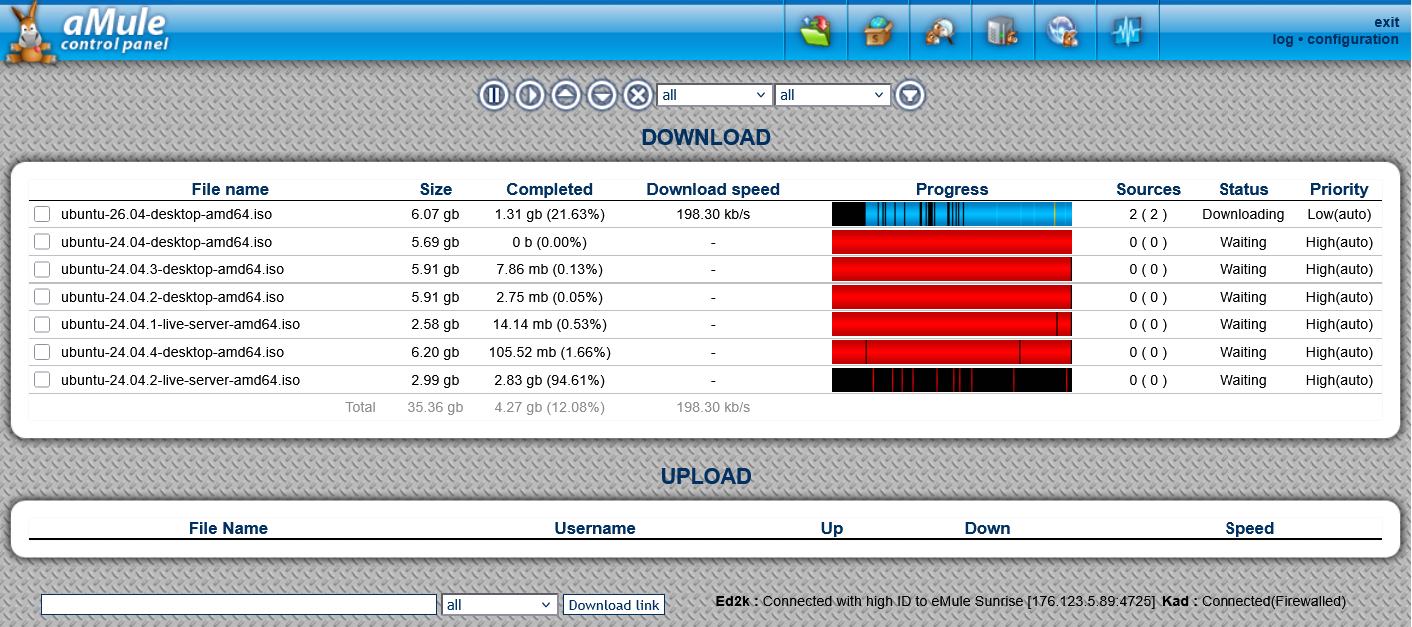
Overview
aMule itself does not speak HTTP. amuleweb bridges the gap: it listens for browser connections on one port (HTTP) and forwards commands to aMule on another port (EC). Once the link is established you can search for files, manage downloads, view queue status, and change certain settings from any web browser — from any location with internet access.
Available functionality through the legacy WebUI:
- Search for files across eD2k and Kademlia.
- Start, pause, resume, and cancel downloads.
- View the download and upload queue.
- Set file priorities from the Shared page.
- Monitor status information (speeds, connections, ID).
- Add eD2k links directly via the footer Download link form.
- Change some aMule options.
The default template was modernized in aMule 3.0.1: an HTML5 doctype, UTF-8 encoding, presentational markup consolidated into style.css, and a refreshed favicon. Alongside the cleanup came select-all checkboxes on file tables, download and delete actions that confirm with a file count, an auto-refresh that pauses while rows are selected and no longer triggers the browser's form-resubmission prompt, button tooltips, and consistent button styles and size/speed units.
The same release hardened it against cross-site scripting (remote-controlled strings are escaped and the search sort parameter is whitelisted), and its embedded web server now parses HTTP requests more robustly.
Command-Line Options
Options can be given on the command line or written to the configuration file (with --write-config). Command-line options take precedence over config-file options.
External Connections (link to aMule)
| Option | Description |
|---|---|
-h, --host=<host> | Host where aMule is running; an IP address or DNS name (default: 127.0.0.1) |
-p, --port=<port> | aMule's port for External Connections (default: 4712) |
-P, --password=<password> | External Connections password (plaintext; hashed internally) |
-f, --config-file=<path> | Use the given configuration file (default: ~/.aMule/remote.conf) |
-l, --locale=<lang> | Set the program locale (language) |
-q, --quiet | Do not print any output to stdout |
-v, --verbose | Be verbose — also show debug messages |
-w, --write-config | Write the command-line options to the config file and exit |
--create-config-from=<path> | Create the config file based on a valid aMule amule.conf, then exit |
--force-zlib | Force ZLIB compression even when the core resolves to a local/LAN IP; useful over a VPN tunnel that resolves to a LAN IP. Sets /EC/ForceZLIB |
--help | Print a short usage description |
--version | Display the version number |
Web server
| Option | Description |
|---|---|
-t, --template=<name> | Load the template (skin) named <name> (default: default) |
-s, --server-port=<port> | Web server HTTP port — the port the browser connects to (default: 4711) |
-u, --enable-upnp | Use UPnP port forwarding on the web server port |
-U, --upnp-port=<port> | UPnP port (default: 50001) |
-z, --enable-gzip | Enable gzip compression of HTTP traffic to save bandwidth |
-Z, --disable-gzip | Disable gzip compression (this is the default) |
-A, --admin-pass=<passwd> | Full access password for the web server |
-G, --guest-pass=<passwd> | Guest password for the web server |
-a, --allow-guest | Allow guest access |
-d, --deny-guest | Deny guest access (this is the default) |
-L, --load-settings | Load/save web server settings from/to the remote aMule, ignoring command-line and config-file settings |
-N, --no-script-cache | Recompile PHP pages on each request (for template development) |
--no-php | Deprecated — has no effect |
--amule-config-file=<path> | aMule config file path. Do not use directly — aMule sets this when launching amuleweb at startup; it implies -q -L |
Default Ports
| Component | Default port |
|---|---|
| aMule EC (for amuleweb ↔ amuled) | 4712 |
| amuleweb HTTP (for browser ↔ amuleweb) | 4711 |
The data flow is:
aMule/amuled ──[EC: 4712]──► amuleweb ──[HTTP: 4711]──► web browser
Do not confuse the two ports. The browser connects to 4711; amuleweb connects internally to aMule on 4712.
Password Setup
A password must be set, otherwise amuleweb refuses all connections.
Set the admin password when starting amuleweb:
amuleweb --admin-pass=yourpassword
Or write it to the configuration file first (see Step-by-Step Setup).
Step-by-Step Setup
This guide walks through setting up amuleweb from scratch.
1. Install aMule with the legacy WebUI
See Installation for pre-built packages, or Compilation to build aMule with the legacy WebUI from source.
2. Run amuled once to create the configuration
amuled
Wait a moment for ~/.aMule/amule.conf to be created, then stop amuled (Ctrl+C or killall amuled).
3. Edit ~/.aMule/amule.conf
Find and set these lines in the [ExternalConnect] section:
AcceptExternalConnections=1
ECPassword=56f491c56340a6fa5c158863c6bfb39f
Generate the MD5 hash of your chosen EC password:
echo -n yourpassword | md5sum
# Output: 56f491c56340a6fa5c158863c6bfb39f  -
Copy the hash (without the trailing -) into ECPassword.
4. Generate the amuleweb configuration
amuleweb \
  --write-config \
  --host=127.0.0.1 \
  --password=yourpassword \
  --admin-pass=webpassword
--password— the EC password used to connect toamuled(plaintext;amulewebhashes it internally).--admin-pass— the password users enter in the browser to log in to the legacy WebUI.
5. Start the services
# Start amuled first:
amuled -f &

# Then start amuleweb:
amuleweb
6. Connect with a browser
Open http://127.0.0.1:4711 (replace 127.0.0.1 with the server's hostname or IP for remote access).
Template (Skin) Locations
amuleweb uses HTML/CSS templates (called skins) to render the interface. It searches for templates in this order:
$HOME/.aMule/webserver/<skin-name>/- The installation prefix:
/usr/local/share/amule/webserver/(compiled) or/usr/share/amule/webserver/(package-installed).
The default skin name is default. Change it with the Template key in amule.conf ([WebServer] section) or the /WebServer/Template key in remote.conf.
If amuleweb fails to start because it cannot load the template, create the directory manually and copy the template files:
mkdir -p ~/.aMule/webserver/default
cp -r /path/to/amule-source/src/webserver/default/* ~/.aMule/webserver/default/
Running as a System Service
init.d script (Debian/Ubuntu/generic)
Save the following as /etc/init.d/amule and make it executable (chmod 755). Edit USER= to match your aMule user and adjust DAEMON/WEB paths as needed.
Create /etc/default/amule containing a single line — amuleweb will not start without it:
RUNAMULE=yes
#!/bin/bash
PATH=/usr/local/sbin:/usr/local/bin:/sbin:/bin:/usr/sbin:/usr/bin
DAEMON=/usr/bin/amuled
WEB=/usr/bin/amuleweb
NAME=amuled
DESC=amuled
RUNAMULE=no
USER=youramuleuser

test -x $DAEMON || exit 0

if [ -f /etc/default/amule ]; then
    . /etc/default/amule
fi

if [ "$RUNAMULE" != "yes" ]; then
    echo "aMule not to be started. Edit /etc/default/amule first."
    exit 1
fi

set -e
case "$1" in
  start)
    echo -n "Starting $DESC: "
    su $USER -c "$DAEMON -f"
    while ! netstat -l -n -p -t | grep -q amuled; do sleep 1; done
    su $USER -c "$WEB --quiet &"
    echo "$NAME."
    ;;
  stop)
    echo -n "Stopping $DESC: "
    killall --quiet --ignore-case $WEB
    killall --quiet --ignore-case $DAEMON
    echo "$NAME."
    ;;
  restart|force-reload)
    echo -n "Restarting $DESC: "
    killall --quiet --ignore-case $WEB
    killall --quiet --ignore-case $DAEMON
    sleep 1
    su $USER -c "$DAEMON -f"
    while ! netstat -l -n -p -t | grep -q amuled; do sleep 1; done
    su $USER -c "$WEB --quiet &"
    echo "$NAME."
    ;;
  *)
    N=/etc/init.d/$NAME
    echo "Usage: $N {start|stop|restart|force-reload}" >&2
    exit 1
    ;;
esac
exit 0
Register the script to run at startup:
# Debian/Ubuntu:
update-rc.d amule defaults
Ubuntu built-in
Ubuntu ships /etc/init.d/amule-daemon. Configure the user by editing /etc/default/amule-daemon — amuled will then start automatically at boot as that user.
PHP Scripting (Advanced)
amuleweb supports server-side scripting in its templates using a PHP-like language called aMuleWeb PHP. Pages with a .php extension are parsed and executed by the built-in script engine. This allows template authors to build dynamic interfaces that query and control aMule directly.
aMuleWeb PHP is similar to PHP 5 in syntax but has significant differences and limitations.
Language Characteristics
- Scalar (
$var) and array (@var) variables; all variables local unless declaredglobal. - All PHP operators supported, with implicit type conversion (
1 + "2" = 3). - Integer variables are 64-bit unsigned.
- Functions must be defined before they are called (no forward declarations).
- All function parameters are required; omitted parameters receive
0or""as defaults. includeis a parse-time directive (not run-time).- No OO support (classes pass the syntax check but are not executed).
- Variable substitution inside double-quoted strings is not supported.
- Prefix and postfix
++/--are not distinguished (prefix form is used).
Supported Library Functions
| Function | Description |
|---|---|
var_dump($var) | Dump variable type and value to output |
strlen($string) | Return string length in bytes |
count($array) | Return number of elements in an array |
isset($var) | Return true if variable is set and not NULL |
usort($array, $func_name) | Sort array in-place using a named comparison function; keys are reset |
split($pattern, $string, $limit) | Split $string by POSIX extended regex $pattern; $limit parameter is required but currently unused |
_($message), gettext($message) | Return translated string (requires NLS compiled in; returns original string otherwise) |
gettext_noop($message) | Return $message unchanged; marks the string for gettext extraction without translating (NLS only) |
ngettext($msgid1, $msgid2, $n) | Return singular or plural translation based on $n (NLS only) |
Predefined Variables
| Variable | Description |
|---|---|
$_SESSION["guest_login"] | 1 if the current user authenticated with the guest password |
$_SESSION["login_error"] | Set to a message string when authentication fails |
$_SESSION["auto_refresh"] | Auto-refresh interval in seconds (user-configurable; 0 disables) |
$HTTP_GET_VARS | Hash of GET/POST parameters from the browser |
aMule API Functions
These functions query or control the running aMule instance:
amule_get_stats()
Returns an associative array with current aMule status:
| Key | Description |
|---|---|
id | Your eD2k ID |
serv_addr | Connected eD2k server IP |
serv_name | Connected eD2k server name |
serv_users | Number of users on the server |
kad_connected | 1 if connected to Kademlia |
kad_firewalled | 1 if Kademlia is firewalled |
speed_up | Current upload speed (bytes/s) |
speed_down | Current download speed (bytes/s) |
speed_limit_up | Upload limit (bytes/s) |
speed_limit_down | Download limit (bytes/s) |
amule_load_vars($command)
Queries aMule data structures. The $command parameter selects which data to retrieve:
$command | Returns |
|---|---|
"downloads" | Currently downloading files |
"uploads" | Currently uploading files |
"shared" | All shared files |
"searchresult" | Results of the most recent search |
"servers" | Server list |
"stats_graph" | Speed graph images |
"stats_tree" | Statistics tree |
Download entry keys: name, short_name, hash, progress (PNG image), link, category, status, size, size_done, size_xfer, speed, src_count, src_count_not_curr, src_count_a4af, src_count_xfer, prio, prio_auto, last_seen_complete.
Status values for downloads: 0 = ready/downloading, 4 = error, 5 = insufficient disk space, 7 = stopped or paused, 8 = completing, 9 = complete, 10 = allocating disk space.
Upload entry keys: name, short_name, user_name, xfer_up, xfer_down, xfer_speed.
Shared file entry keys: name, short_name, hash, size, link, xfer, xfer_all, req, req_all, accept, accept_all, prio, prio_auto.
Search result entry keys: name, short_name, hash, size, sources, present.
Server entry keys: name, desc, addr, users, ip, port, maxusers, files.
Other API Functions
| Function | Description |
|---|---|
amule_get_version() | Returns the aMule version string (e.g. "aMule 3.0.0") |
amule_get_categories() | Returns an indexed array of download category name strings |
amule_get_options() | Returns all configurable options as a nested associative array |
amule_set_options($hash) | Applies options; pass the array returned by amule_get_options with modified values |
amule_do_download_cmd($hash, $cmd, $prio) | Control a download by hash: $cmd is "pause", "resume", "cancel", "prio", "prioup", or "priodown"; $prio is used with "prio" |
amule_do_shared_cmd($hash, $cmd, $prio) | Set shared file priority by hash: $cmd is "prio" or "prio_auto"; $prio sets the priority value |
amule_do_reload_shared_cmd() | Reload shared files from disk |
amule_do_add_server_cmd($addr, $port, $name) | Add an eD2k server to the server list |
amule_do_server_cmd($ip, $port, $cmd) | Send a command to a server: "connect", "disconnect", or "remove" |
amule_do_ed2k_download_cmd($link, $cat) | Queue an eD2k link for download in category $cat (integer index) |
amule_do_search_start_cmd($term, $ext, $type, $search_type, $avail, $min_size, $max_size) | Start a search: $search_type is 0=local, 1=global, 2=Kad; $avail is minimum source count; $min_size/$max_size are byte limits (0 = no limit) |
amule_do_search_download_cmd($hash, $cat) | Queue a search result for download in category $cat |
amule_get_log($reset) | Return log contents as a string; pass 1 to clear the log before reading, 0 to read without clearing |
amule_get_serverinfo($reset) | Return server info log as a string; pass 1 to clear before reading, 0 to read without clearing |
Network Control Functions
These functions control aMule's connection to the eD2k and Kademlia networks:
| Function | Description |
|---|---|
amule_kad_start() | Start the Kademlia network, bootstrapping from the on-disk nodes.dat |
amule_kad_connect($ip, $port) | Bootstrap Kademlia from a specific node's IP address and UDP port |
amule_kad_disconnect() | Stop the Kademlia network |
amule_kad_update_from_url($url) | Download a fresh nodes.dat from $url, bootstrap Kademlia from it, and persist the URL into the KadNodesUrl preference so later starts reuse the same source |
amule_server_disconnect() | Disconnect from the current eD2k server (does not require an IP/port, unlike amule_do_server_cmd) |
Authentication
Authentication and session management are handled by the webserver itself, not by the scripting engine. Scripts cannot directly read the password or session token.
Debugging
All error messages are printed to the terminal where amuleweb was started. Start amuleweb manually from a terminal (do not start it automatically from aMule's Remote Controls preferences) to see script errors.
Error types:
- Compile-time — syntax errors (missing
;, mismatched()). - Run-time — division by zero, wrong parameter types.
- Logic — silent; use
var_dump()to trace.