alc / alcc — ed2k Link Generator
ALinkCreator is a tool that generates ed2k links for files on your local filesystem. It supports all optional ed2k link values and is very fast at hashing files. It ships in two variants:
| Binary | Interface |
|---|---|
alc | Graphical (windowed) |
alcc | Command-line (text-only) |
Both variants compute the full ed2k hash of a file and output the complete ed2k link. Part hashes are optional and disabled by default; they can only be added for files larger than 9.5 MB (see below). Both tools work independently of a running aMule instance and are compatible with --disable-monolithic builds.
Using alc (GUI)
Launch with:
alc
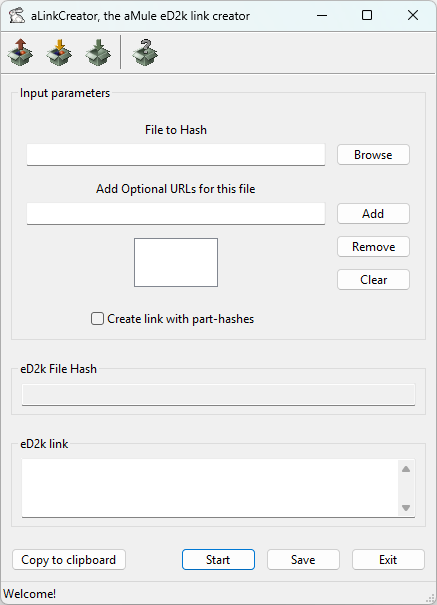
alc hashes one file at a time. In the graphical interface:
- Set the file in the File to Hash field, either by typing the path or with the Browse button (or the Open toolbar button).
- (Optional) Add source URLs in the Add Optional URLs for this file field with Add; remove them with Remove / Clear. If a URL ends in
/, the current file name is appended automatically. - (Optional) Tick Create link with part-hashes to include part hashes in the link. This helps spread new and rare files faster, at the cost of a larger link.
- Click Start to compute the hash.
The result appears in the read-only eD2k File Hash and eD2k link fields. Use Copy to clipboard to copy the link, or Save to write it to a file.
Using alcc (Console)
alcc is the command-line variant. Change to the directory containing the file, or specify an absolute path.
Synopsis:
alcc [-p] [-v] <inputfiles_list>
alcc [-h]
Options:
| Short | Long | Description |
|---|---|---|
-p | --parthashes | Compute and add part hashes to the ed2k link (only used for files > 9.5 MB). |
-v | --verbose | Be verbose — also show the calculation steps. |
-h | --help | Print a short usage description and exit. |
The ed2k link of each file is printed to stdout; verbose messages and errors (e.g. non-existent files) go to stderr.
Single file:
alcc filename.iso
Multiple files in one command:
alcc file1.iso file2.mkv file3.zip
Each file produces one ed2k link on stdout. By default the link carries no optional fields:
ed2k://|file|filename.iso|734003200|A1B2C3D4E5F6A7B8C9D0E1F2A3B4C5D6|/
With -p, part hashes are appended as a colon-separated p= field before the trailing slash (only for files larger than 9.5 MB):
alcc -p filename.iso
ed2k://|file|filename.iso|734003200|A1B2C3D4E5F6A7B8C9D0E1F2A3B4C5D6|p=AABBCCDDEEFF00112233445566778899:00112233445566778899AABBCCDDEEFF|/
The link can be:
- Pasted into an aMule search bar or ed2k link handler.
- Shared with others on forums or chat.
- Saved to a text file for later use.
- Passed to
amulecmd -c "add <link>"to queue the download remotely.