eD2k Servers
On the eD2k network, a server is a central machine that maintains an index of which clients share which files. When you connect to a server, it provides search results, source lists for downloads, and — if your client has a Low ID — relays connections on your behalf.
Most eD2k servers are interconnected, which allows global searches that span all known servers simultaneously.
The Kademlia network works without any servers: every client simultaneously acts as its own server. Running both networks at the same time is the recommended configuration for aMule.
Server software
The main server software used on the eD2k network is the Lugdunum server (also referred to as eserver). It was created by reverse-engineering the eDonkey protocol and redesigned entirely from scratch. The original MetaMachine server software was abandoned after MetaMachine ceased operations; its source code was revealed to the Lugdunum project in late 2002 but was never used. By 2008, virtually all active eD2k servers ran the Lugdunum software.
| Property | Details |
|---|---|
| Author / maintainer | lugdunummaster |
| License | Gratis (free as in beer), not open source |
| Platforms | Linux, Windows, several Unixes |
| Homepage | http://lugdunum2k.free.fr/kiten.html (defunct) |
The stated reason for keeping the source closed is to make it harder to create fake servers and to prevent attacks against the server software itself.
Protocol extensions
Lugdunum extended the eD2k protocol while maintaining backward compatibility with older clients. Extensions implemented by Lugdunum include:
- Complex Boolean searches — queries of the form
one AND two AND (three OR four) NOT five(see Search logic). aMule limits an expression to 10 operators (AND,ORandNOTcombined); anything more complex is rejected with "Search expression is too complex". - Auxiliary ports — additional listening ports for clients whose ISPs block port 4661 (see Connecting via auxiliary ports)
- Extended GetSources — richer source information per request
- Extended file metadata — artist, album, title, duration, bitrate and codec fields attached to files
aMule's changelog tracks coordination with lugdunummaster across multiple releases, from Lugdunum 16.40 through at least 17.7.
Version tag in server.met
The Version tag (0x91) in a server.met record stores the version and name of the software the server is running. In practice the value looks like 17.6 or 17.7 (lugdunum). The following is an actual message from an aMule log:
2005-12-11 06:58:09: ServerMessage: server version 17.7 (lugdunum)
2005-12-11 06:58:09: ServerMessage: Rasorpack 2 - Dual Opteron Server / www.rasorpack2.com
Other server software
| Software | Year | Notes |
|---|---|---|
| MetaMachine original | 2000–2002 | C++, closed source, no longer maintained |
| Lugdunum / eserver | 2002–present | Dominant software; closed source, gratis |
| satan-edonkey-server | 2007 | Announced after DonkeyServer shutdown; C++ and Java versions; gratis; source audited by eMule developers for hidden spy code |
| ed2j | 2012 | Open source Java implementation; available on GitHub |
aMule is entirely independent of Lugdunum. aMule is an eD2k client, not server software, and has no affiliation with the Lugdunum project.
The server list
The server list is the list of eD2k servers your client can connect to. Each entry contains at minimum:
| Field | Description |
|---|---|
| Name | Display name for the server |
| IP address | IPv4 address of the server machine |
| Port | TCP port (typically 4661, but can differ — see auxiliary ports) |
| Priority | Normal (default), High, or Low — controls connection order |
The server list is stored in the binary server.met file at ~/.aMule/server.met. Additional per-server statistics (ping time, failure count, user count, file count, UDP capability flags) are also recorded there.
In aMule, the server list is visible in the Networks panel, eD2k tab:
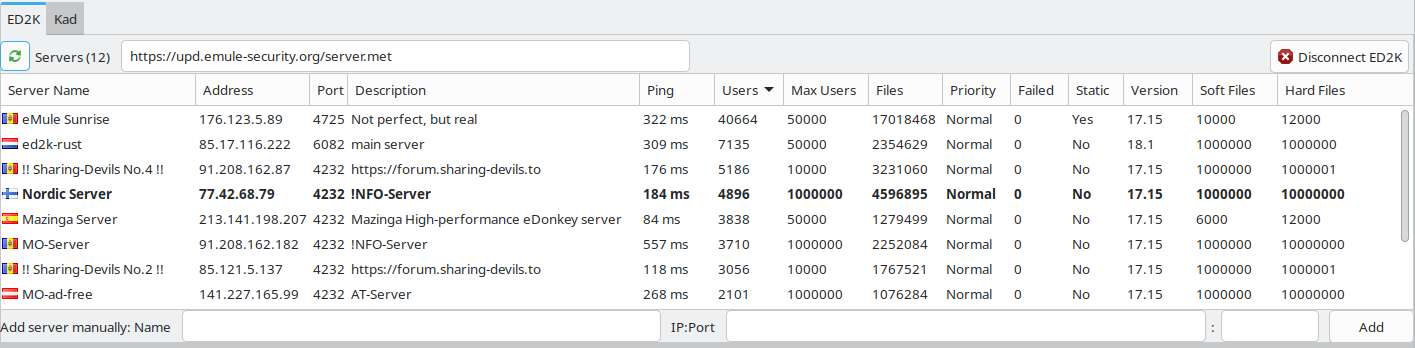
aMule connects to one server at a time. With the Score system enabled (the default — see Preferences → Servers), it sorts the list by priority and tries servers in priority order (High → Normal → Low). Ping time and failure count are recorded and shown per server, but they do not determine the connection order.
Server ports
Standard server TCP port — 4661
The standard TCP port on which eD2k servers listen for incoming client connections is 4661. Clients connect outward to this port; it is a server-side configuration and aMule users do not need to configure or forward it.
Extended server requests UDP port
The extended server requests UDP port is the port through which all non-core packets are sent to the server. This includes:
- File ratings
- Extended file descriptions (artist, album, title, duration, bitrate, codec)
- Global source queries
This port is historically defined as Standard Server TCP Port + 4 = 4661 + 4 = 4665. It is also the port used for Kademlia communication between nodes. See Ports in the eD2k Network reference for the full port table.
Auxiliary server ports
Some servers listen on additional ports beyond 4661. This feature was introduced by lugdunummaster specifically because some ISPs block standard eD2k ports. For example, Razorback 2 historically also accepted connections on port 80.
The additional ports a server supports are advertised in the ST_AUXPORTSLIST tag (0x93) of the server's server.met record, as a comma-separated list.
aMule has supported auxiliary server ports since version 2.0.0. See Connecting via auxiliary ports below for instructions.
Connecting via auxiliary ports
If your ISP blocks port 4661, you can connect to servers that advertise auxiliary ports:
- Check for duplicates — make sure the server you want to connect to is not already in your server list. Adding a duplicate causes the server to blacklist your client.
- In the Networks → eD2k tab, enter the server's IP address and auxiliary port in the Add Server field (e.g.
195.245.244.243:80) and press Enter. - Right-click the newly added entry in the server list and choose Connect.
- Once connected, the server list will show
4661 (80), meaning: the server's standard port is 4661, but you are connected via port 80.
A client that connects via an auxiliary port must still advertise the standard port (4661) to other clients — not the auxiliary port. This is handled automatically by aMule.
High ID and Low ID
Every client connected to an eD2k server is assigned an ID by the server:
- High ID — your standard client TCP port (default: 4662) is reachable from the internet. You can accept incoming connections from any other client. The ID value encodes your IP address.
- Low ID — your TCP port is blocked. You cannot exchange data with other Low ID clients; the server relays connections on your behalf. Any ID below
16,777,216indicates a Low ID.
A Low ID significantly reduces available download sources (only High ID peers can reach you) and many large servers reject Low ID clients outright. It is strongly recommended to obtain a High ID by forwarding TCP port 4662 on your router.
See High ID and Low ID for the ID calculation formula and consequences, and Network Connectivity for how to configure your router and firewall to obtain a High ID.
Static servers
A static server is a server you have marked as essential. Static servers are never automatically removed from your server list, even if the number of connection failures exceeds the normal threshold that would cause a regular server to be dropped.
Behaviour
- If you manually remove a static server from the list, it will reappear the next time aMule starts, because it is loaded from
staticservers.daton every startup. - To permanently remove a static server, you must first un-mark it as static (right-click → remove static flag), then remove it from the list.
- In Preferences → Servers, you can enable the option to autoconnect only to static servers on startup. This is useful when you maintain a small, trusted list of servers and want to avoid connecting to others.
Configuration
Static servers can be managed through the aMule GUI (right-click a server → Mark as static / Unmark as static) or by editing the staticservers.dat file directly.
The staticservers.dat file takes precedence over server.met: if the same server IP and port appears in both files, the staticservers.dat entry overrides the server.met data.
Fake servers
A fake server is an eD2k server operated with malicious intent. There are three common variants:
For the user-facing companion to this section — how to detect fake files, identify a fake server, and block it with the IP filter — see Fake Files and Servers.
1. Search result manipulation
These servers intercept search queries and return corrupted results: files that are actually viruses, spyware, or DRM-encumbered WMV files disguised as the content the user searched for. The delivered files have the correct name but their content is replaced.
2. User tracking and logging
These servers connect with high user counts (sometimes reporting up to 1.5 million users) to appear legitimate, but they log the IP addresses and search queries of connected clients without providing useful sources. They are often operated by copyright enforcement organisations.
3. Impersonation
After the seizure of Razorback 2 on 21 February 2006 (by the Belgian Federal Police, acting on a complaint by the MPAA and IFPI), the MPAA and IFPI themselves deployed multiple fake servers mimicking the Razorback 2 identity. These fake Razorback 2 servers reported large user counts but returned no usable search results, with the explicit intent of hampering file-sharing traffic.
How fake servers spread
Versions of aMule before 2.2.0 were configured by default to automatically add servers from two sources:
- "Update serverlist when connecting to a server" — adds servers announced by the server you connect to
- "Update server list when a client connects" — adds servers advertised by connecting clients
If either option is enabled and you connect to a fake server, fake servers flood into your list. The common belief that "more servers in the list = better" is incorrect and dangerous.
Mitigation options
- Curate your server list (recommended) — see Maintaining a safe server list below.
- Use Kademlia only — disable eD2k entirely and rely solely on the Kademlia network, which has no central servers and therefore no fake-server problem.
Maintaining a safe server list
Follow these steps in order:
Step 1 — Disable automatic server list updates
In Preferences → Server, disable both:
- Update serverlist when connecting to a server
- Update server list when a client connects
This prevents your list from being polluted by servers that advertise fake entries.
Step 2 — Clear the current server list (if necessary)
If you cannot verify that every server currently in your list is legitimate, remove them all. In the Networks → eD2k tab, right-click the server list and choose Remove All.
If you are certain that all your current servers are legitimate, you may skip this step.
Step 3 — Download a trusted server list
Enter a trusted server.met URL in the URL field at the top of the Networks → eD2k tab, then click the play button (▶) next to it. aMule downloads the list and merges it into your existing server.met (it does not replace your list outright).
Known trusted sources:
| URL | Notes |
|---|---|
https://upd.emule-security.org/server.met | Default URL configured in aMule; maintained by the eMule Security project |
https://shortypower.org/server.met | Aggregated server list |
These are third-party services unaffiliated with the aMule project. Their availability may change. If a URL no longer resolves, search for server.met eMule to find current mirrors.
Step 4 — (Optional) Enable automatic updates with a trusted URL
In Preferences → Server, enable Autoupdate serverlist at startup, then set the URL to one of the trusted sources above. aMule will refresh the list each time it starts.
You can also add URLs to ~/.aMule/addresses.dat (one per line) to have them checked at startup when auto-update is enabled — see the addresses.dat reference.
If your server list becomes empty
Click the play button (▶) next to the URL field in the Networks → eD2k tab to re-fetch the list from the configured URL.
Kademlia: no servers required
On the Kademlia network, there are no dedicated server machines. Every client is simultaneously its own server: it stores a portion of the distributed index and answers queries from other clients. The network is fully decentralised and requires no central points to function.
Because Kademlia has no servers, it is immune to the fake-server problem described above. It is also unaffected by server seizures or operator shutdowns.
aMule can run both eD2k and Kademlia at the same time. Sources found on either network are used together for the same downloads, since both networks share the same MD4-based file identification and 9.28 MB chunk system.
See Kademlia Network for a full description of the algorithm, bootstrapping, contact types, and firewalled status.