amuleapi — REST API & Web UI
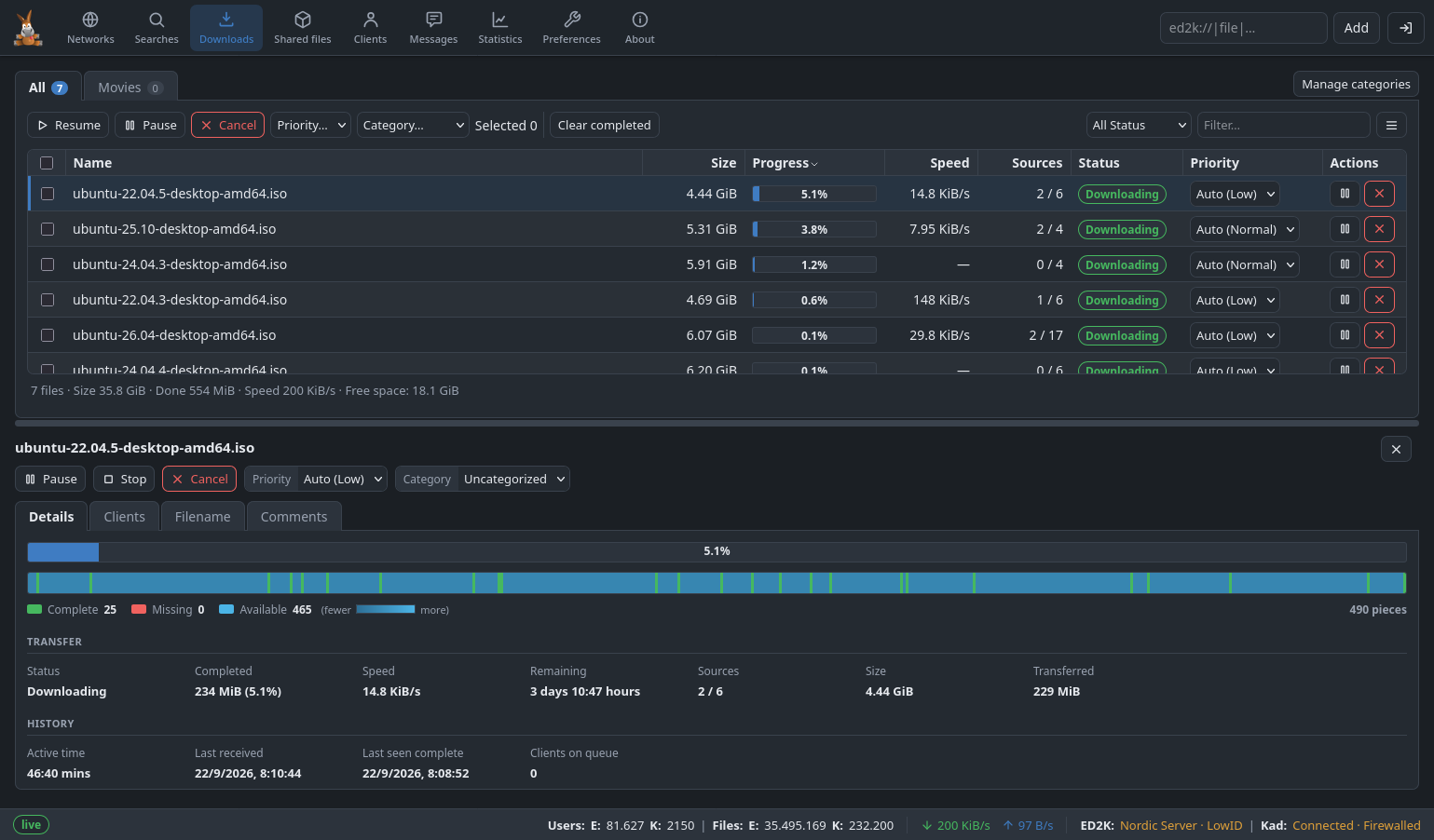
amuleapi is a standalone daemon that connects to a running amuled (or amule) instance as an ordinary External Connections (EC) client and exposes a modern control surface: a versioned REST API under /api/v1/*, a Server-Sent Events (SSE) stream for live updates, and the full browser-based Web UI. It is the replacement for amuleweb.
This functionality is available from aMule 3.1.0 onwards.
Overview
Where amuleweb renders HTML server-side from templates, amuleapi serves a clean HTTP API and a single-page Web UI that talks to it. Use amuleapi when you want to control aMule from a browser, script it over REST, or receive real-time updates without polling. It runs anywhere amuled runs, including headless servers and NAS devices.
amuleapi speaks HTTP only, by design — terminate TLS in a reverse proxy in front of it (see Security Model).
Command-Line Options
| Option | Description |
|---|---|
-h, --host=<host> | Host where aMule is running, for the EC connection (default: 127.0.0.1; overrides [EC] Host). -h is the host, not help — use --help |
-p, --port=<port> | aMule's EC port (default: 4712; overrides [EC] Port) |
--disable-ec-encryption | Connect to aMule without EC encryption for this run (overrides [EC] Encryption) |
--bind=<address> | Address the HTTP server listens on (default: 127.0.0.1; overrides [Server] BindAddress). With any address other than 127.0.0.1, ::1 or localhost, amuleapi refuses to start until an admin or guest password is set |
--http-port=<port> | HTTP port the browser and API clients connect to (default: 4713; overrides [Server] Port; a value outside 1–65535 is ignored) |
--config-dir=<path> | Use the given configuration directory for amuleapi.conf, amuleapi-passwords, amuleapi-jwt-secret and the default log file (default: the aMule configuration directory, e.g. ~/.aMule/ on Linux; created with mode 0700 if missing) |
--set-admin-pass=<password> | Store the admin password in amuleapi-passwords, then exit without connecting to aMule or starting the HTTP server (non-zero exit code on failure) |
--set-guest-pass=<password> | Store the guest password the same way, then exit; an empty value (--set-guest-pass=) disables guest access. If given together with --set-admin-pass, only the admin password is set |
--log-file=<path> | Write the log to <path> instead of the default <config-dir>/amuleapi.log. The log is a timestamped copy of the console output, capped at 10 MiB and rotated to <path>.1 |
--no-log-file | Do not write a log file; print to the console only (takes precedence over --log-file) |
-q, --quiet | Suppress amuleapi's normal output, including error messages, on the console and in the log file; only a few warnings on stderr still appear |
--foreground | Stay in the foreground (the default; amuleapi never detaches — use systemd/launchd or nohup to run it as a service) |
--version | Print the version number and exit |
--help | Print a short usage description and exit |
There is deliberately no --password flag: an EC password passed on the command line would be visible to any local user via ps. An auto-started amuleapi uses a one-off token (see Auto-Start); a hand-started one reads [EC] Password from its config file. Use --set-admin-pass / --set-guest-pass (or Preferences → Remote Controls in the GUI) to set the Web UI login passwords.
Configuration File
amuleapi reads amuleapi.conf from its configuration directory. The file is created on first run with mode 0600. On every load, amuleapi checks that no group or other permission bits are set and refuses to start otherwise (it prints the chmod 600 command to fix it); this check does not apply on Windows. It has four sections:
[Server]— HTTP bind address, port, CORS, and the Web UI asset root.[EC]— howamuleapireaches the aMule core (host, port, password, encryption).[Auth]— per-IP rate limiting for logins and rejected tokens.[Streaming]— SSE ring-buffer size and the concurrent file-download limit.
Most settings can also be set from Preferences → Remote Controls or the command-line options above. See the amuleapi.conf reference for every key, its default, and a full example.
Auto-Start
When aMule (or amuled) has amuleapi enabled in Preferences → Remote Controls, it launches amuleapi as a child process at startup and stops it on shutdown. In this mode aMule writes a one-off EC token to the file amuleapi-ec-token (mode 0600, read once, then deleted) and passes only --bind and --http-port on the command line — so no EC password is needed. A hand-started amuleapi instead authenticates with the [EC] Password from its config file.
Authentication
amuleapi issues an HS256 JSON Web Token (JWT) on login, valid for 24 hours. Present it on every request either as an Authorization: Bearer <jwt> header or via the HttpOnly cookie amuleapi_token (SameSite=Strict; Path=/api/v1). The cookie is deliberately not marked Secure, so a single login response works whether or not TLS is terminated in front of the daemon.
There are two roles:
- admin — full read/write access.
- guest — read-only, and available only when a guest password has been set.
Log in with a password, not a username; the password you enter selects the role. The signing secret is 32 random bytes generated on first run and stored in amuleapi-jwt-secret (mode 0600). Login attempts and rejected tokens are rate-limited per IP using the [Auth] knobs above; exceeding a threshold returns 429 Too Many Requests with a Retry-After header.
Changing Passwords
Set or change the admin and guest login passwords from the console with amuleapi itself:
amuleapi --set-admin-pass=<password>
amuleapi --set-guest-pass=<password>
Each command hashes the password (salted PBKDF2-HMAC-SHA256), writes it to the amuleapi-passwords store (mode 0600), and then exits immediately — it does not start the HTTP server or connect to aMule. No path is needed: amuleapi uses the same configuration directory as amuled (add --config-dir=<path> if it is non-standard). The change takes effect at the next login, with no restart, and the command returns a non-zero exit code on failure (so a chain like amuleapi --set-admin-pass=… && systemctl restart amuleapi fails loudly).
An empty guest password turns guest access off:
amuleapi --set-guest-pass=
A stored password can never be read back, only replaced. The same passwords can also be set from Preferences → Remote Controls (in the monolithic amule, or pushed to the core by amulegui over EC), or over REST with PATCH /api/v1/auth/passwords. Every route writes the same amuleapi-passwords file.
This is the Web UI login password (admin/guest). It is different from the [EC] Password in amuleapi.conf, which is the password amuleapi uses to connect to the aMule core over External Connections.
Server-Sent Events
GET /api/v1/events returns a text/event-stream carrying incremental deltas — it does not send an initial snapshot. A client bootstraps by opening the stream, fetching current state from the REST endpoints, and then applying the deltas that arrive. Events are grouped into channels:
downloads, shared, servers, clients, friends, status, logs, search, chats, comments.
Subscribe to a subset with ?channels=<comma-separated>; the resync control frame is always delivered. A : keepalive heartbeat comment is sent every 15 seconds. On reconnect, the client's Last-Event-ID header replays any missed events held in the ring buffer (see [Streaming] EventBusRingCapacity).
REST API
All endpoints live under the base path /api/v1. The endpoint groups are:
- System — health, version, status.
- Authentication — login, logout.
- Downloads — the download queue, plus per-file comments, filenames, clients and clear-completed.
- Clients and Known clients — active peers and the credit-store history.
- Shared files — shared files, share directories, verify, media refresh.
- Servers — the eD2k server list, plus the server-list update (
servers_update). - Friends, Categories.
- Preferences — read (
GET) and update (PATCH). - Network control — networks and Kad control.
- IP filter, GeoIP (database update; see IP2Country).
- Logs, Statistics, Search, Assets, Chat.
Security Model
- HTTP only by design — put a reverse proxy in front to terminate TLS. To serve it under a path of a shared hostname (e.g.
/amule/), setBasePath. - Listens on loopback (
127.0.0.1) unlessBindAddressis changed. - The config file and the generated secret/token files are restricted to
0600.
Reference
The full, authoritative specification lives in the aMule source repository (do not treat this page as the contract):
docs/QUICKSTART-AMULEAPI.md— first-run and reverse-proxy setup.docs/api/REFERENCE.md— the complete per-endpoint REST contract.docs/api/EVENTS.md— the SSE contract.
See the Web UI page for the browser interface amuleapi serves.